Built by a contractor. Not a tech company.
Stop Guessing Your Profit.
Job costing for contractors.
Snap receipts, voice-log expenses, track your crew with GPS, invoice clients, and know your real margins — all in one app. 30+ features. Zero paperwork.
Replace QuickBooks and Expensify for $29.99/month — add GPS crew time tracking for $49.99.
3 sec
Avg receipt scan time
30+
Features built for contractors
10+ hrs
Saved per week on paperwork
100%
Spanish support available
Scan it. Done.
AI receipt scanning in 3 seconds. Reads the store, every line item, tax, total, payment method, and even the PO/job name. Crumpled, faded, handwritten — doesn't matter.
Know Your Numbers.
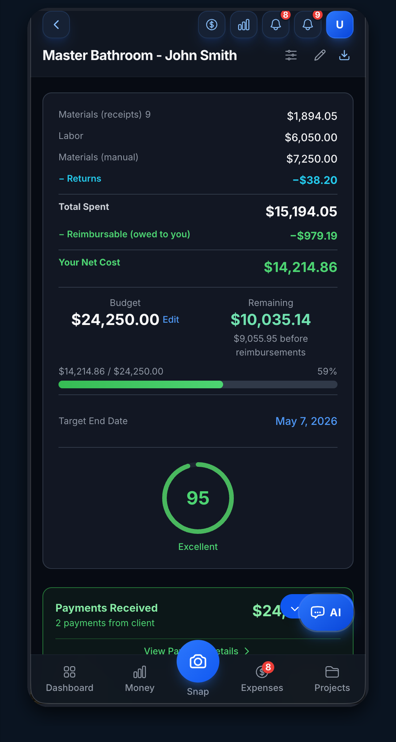
Real-time project budgets, AI alerts before you go over, P&L by project, and spending velocity tracking. Budget warnings hit your phone before the damage is done.
Your Crew, Tracked.
GPS auto-clock-in/out when your team arrives on site. Live team dashboard. Set pay rates, track hours, export for payroll. Up to 5 crew on Contractor, 15 on Business.
The cost of doing nothing
$5,000 – $15,000/year
That's what the average contractor loses in unclaimed deductions from lost, faded, or untracked receipts.
That's $400–$1,250/month you're leaving on the table.
Job Cost Pro is $29.99/month.
Honest comparison
You've tried these. They didn't work.
We know because we tried them too — before we built something that actually fits how contractors work.
What you tried
QuickBooks
Why it didn't work
Built for accountants. No job costing. No AI receipt reading. No GPS crew tracking. You end up typing everything in manually.
Job Cost Pro
Snap the receipt → AI reads it → sorted by job in 3 seconds. Voice-log expenses. GPS tracks your crew. Zero manual entry.
What you tried
Expensify
Why it didn't work
Corporate expense reports for office workers. Doesn't understand PO numbers, job names, or contractor categories. Can't track your crew or generate invoices.
Job Cost Pro
Reads Home Depot, Lowe's, and lumber yard receipts natively. Auto-categorizes into 13 contractor trades. Invoices, tax packages, and client portals built in.
What you tried
Buildertrend / CoConstruct
Why it didn't work
$300–$500/month. 200 features you'll never use. Built for GCs running 50-person crews on commercial projects.
Job Cost Pro
$29.99/month. Every feature you need, none of the bloat. Set up in 60 seconds, not 60 days.
What you tried
The Shoebox Method
Why it didn't work
Tax season panic. Faded thermal paper. Missing half of them. Your accountant charges extra to sort through the mess.
Job Cost Pro
Every receipt photographed, AI-extracted, and searchable forever. One-click tax package at year-end with AI narrative summary.
The magic
What happens when you snap a receipt
Real AI — not basic OCR that chokes on crumpled paper.
You snap this
Any receipt. Any condition.
THE HOME DEPOT #6532
1801 S UNIVERSITY DR
FORT WORTH TX 76107
PO/JOB: JOHNSON KITCHEN
2x4x8 SPF STUD 3 $3.48 $10.44
1/2 DRYWALL 4x8 6 $12.97 $77.82
ROMEX 12/2 250FT 1 $89.97 $89.97
GE LED RECESSED 6PK 2 $24.98 $49.96
DEWALT SCREWS 5LB 1 $15.97 $15.97
SUBTOTAL $244.16
TAX $20.14
TOTAL $264.30
VISA ****6411
AI extracts this
In 3 seconds. Zero typing.
Auto-categorized • Auto-assigned to project • Budget updated • Reimbursable flagged
How it works
Four ways to capture. Zero typing.
Snap a Receipt
Take a photo. AI reads every line item, store name, tax, total, and payment method in ~3 seconds. Works on crumpled, faded, or handwritten receipts.
Voice an Expense
Say "$180 at Home Depot for the Johnson kitchen, lumber" — AI parses amount, vendor, project, and category. Guided prompts while recording.
Track Your Crew
GPS auto-clocks your team in/out at job sites. Both you and your workers get notifications. Export hours for payroll with one tap.
Invoice & Get Paid
Generate professional invoices from project data. Auto-fill line items. Send via email. Clients see a branded portal with progress tracking.
30+ features
Everything you need. Nothing you don't.
Built for the job site, not the office. Every feature exists because a contractor needed it.
AI Receipt Scanning
AIReads store, items, tax, total, and PO/JOB NAME from contractor receipts in seconds.
Voice-to-Expense
AISpeak naturally. AI parses amount, vendor, project, and category from your voice.
Material Returns
AIScan return receipts. AI detects returns and subtracts from project totals automatically.
Smart Project Matching
AIAI reads job names and PO numbers on receipts and auto-assigns to the right project.
Payment Proof Detection
AIScan Zelle, Venmo, or check screenshots. AI detects labor payments vs material receipts.
Budget Overrun Prediction
AIAI analyzes spending velocity vs timeline and warns you before projects go over budget.
Streaming AI Chat
AIAsk questions in plain English. Answers stream in word-by-word so you see progress instantly.
Persistent AI Memory
AITell the AI your pricing ("$76/sqft for quartz") and it remembers across sessions and devices.
AI Bid Generation
AIAsk "generate a bid" and get a full document with your company logo auto-embedded at the top.
AI Project Briefings
AIOne-click AI summary with costs, timeline, risks, and recommendations. Streams in real time.
Client "Pizza Tracker" Portal
Share a branded portal showing milestone progress, photos, and category percentages.
Invoice Generator
Create professional invoices from project data. Auto-fill line items, send via email.
Email Delivery (Resend)
Welcome emails on signup, invoices, payment reminders, and weekly summaries.
One-Click Tax Package
AIDownload ZIP: P&L, 1099 summary, expense categories, receipts CSV, AI narrative.
GPS Store Detection
Detects when you're at Home Depot or Lowe's. Reminds you to scan a receipt when you leave.
GPS Jobsite Clock-In/Out
Team auto-clocks when arriving or leaving project sites. Both worker and owner get notified.
Mileage Tracking
Log trips with IRS deduction calculation at $0.70/mi. Included in your tax package.
Team Management + RBAC
Add crew with their own logins. Server-side role enforcement keeps crew out of financials.
Stripe Billing + Auto Tax
Real subscription management with Pro, Contractor, and Business tiers. Sales tax auto-collected.
Spanish Language Support
Toggle at login for 100% Spanish throughout the entire app.
Custom Branding
Upload your logo (server-validated). Appears on invoices, client portal, AND every AI-generated bid.
Account Deletion (GDPR)
One-tap delete: DB rows + every uploaded file (photos, logos, PDFs) purged from storage.
Reimbursable Tracking
Mark items as reimbursable, track totals per project, export for client billing.
Multi-Page Receipt Scan
AIUpload up to 20 pages for long receipts. AI processes all pages together.
Receipt Splitting
Split a receipt across multiple projects when you buy for different jobs in one trip.
QuickBooks Export
Export data in QuickBooks-compatible CSV/IIF format for your accountant.
Batch Receipt Scanning
AIScan multiple receipts in a row without leaving the capture screen.
Bid Document Upload
AIUpload bid PDFs. AI extracts scope and line items. Auto-sets jobsite address for GPS.
Change Orders
Track change orders per project with amounts and descriptions. Never miss billing extras.
Subcontractor Portal
Share a link for subs to submit their own receipts and expenses to your project.
Audit Log
Full audit trail of every action in the app for accountability and dispute resolution.
Dark Mode
Full dark theme support. Easy on the eyes at 5am or 10pm on the job site.
Powered by real AI
AI That Actually Understands Construction
Reads handwritten POs
When a cashier scrawls "JOHNSON KIT" on your receipt, our AI still matches it to your Johnson Kitchen project. 55%+ confidence auto-assigns.
Knows contractor lingo
Say "180 bucks at the Depot for Johnson, lumber" and AI knows you mean $180 at Home Depot for the Johnson Kitchen project, materials category.
Predicts budget overruns
AI watches your spending velocity — if you're burning through budget faster than your timeline, you get a warning before the damage is done.
Detects return receipts
Snap a return receipt. AI detects negative amounts and automatically subtracts from your project totals across all reports.
¿Hablas español?
Full app available in Spanish. Toggle at login for 100% Spanish — every screen, button, label, and AI response. Your crew can use the app in the language they're most comfortable with.
Built by a contractor who got tired of guessing.
I was running four remodel projects in Fort Worth and couldn't tell you which ones were profitable. Receipts in the truck console. Zelle payments with no records. Lumber yard runs I forgot to track. I tried QuickBooks — too complicated. Tried a spreadsheet — stopped updating it. Tried Expensify — built for corporate expense reports, not contractors.
So I built Job Cost Pro. Every feature exists because I needed it on my own job sites first. This isn't software designed by people who've never held a hammer. It's designed by someone who still does.
— Salvation Home Remodeling, Fort Worth TX
FAQ
Questions? We got you.
How is this different from QuickBooks?
QuickBooks is accounting software built for bookkeepers. Job Cost Pro is built for contractors who need to know their job costs while the job is running. Snap receipts, voice-log expenses, track your crew with GPS, invoice clients — all from one app. No accounting degree needed.
How is this different from Expensify?
Expensify is built for corporate employees submitting expense reports. It doesn't understand PO numbers, job names, or contractor trade categories. Job Cost Pro reads Home Depot receipts, categorizes materials into trades (plumbing, electrical, lumber), auto-matches to projects, and tracks your crew — built specifically for residential contractors.
What's the Voice-to-Expense feature?
Just speak naturally: "$180 at Home Depot for the Johnson kitchen, lumber." AI parses the amount, vendor, project, and category from your voice. You get guided prompts while recording and an editable form after. Faster than typing, especially when your hands are dirty.
Can the AI really detect returns and Zelle payments?
Yes. Snap a return receipt and AI automatically detects it's a return — subtracts from your project totals across all reports. Snap a Zelle, Venmo, or check screenshot and AI detects it's a labor payment, not a material receipt, and categorizes it correctly.
How does GPS crew tracking work?
Add your team members with their own logins. Set a geo-fence around your job sites. When they arrive, they're automatically clocked in. When they leave, clocked out. Both you and your crew get notifications. Export hours for payroll with one tap.
What types of receipts can the AI read?
Any receipt. Home Depot, Lowe's, lumber yards, paint stores, supply houses, hardware stores — even handwritten receipts, multi-page receipts (up to 20 pages), and Zelle/Venmo screenshots. The AI handles crumpled paper, faded ink, and partial receipts.
What's the Client Pizza Tracker Portal?
Share a branded link with your clients. They see project milestones, progress photos, category percentages, and payment status — but no dollar amounts (to protect your margins). Customize with your company logo, colors, and tagline.
Can I generate invoices and send them by email?
Yes. Create professional invoices from your project data with auto-filled line items. Send via email (powered by Resend) — includes invoices, payment reminders, weekly summaries, and welcome emails.
Do I need to download an app?
The iOS app is free on the App Store. On Android or any computer, use the web app at jobcostpro.online — tap "Add to Home Screen" and it works like a native app. An Android app is planned.
Can my crew and subs use it?
Yes, two ways. Add crew members with their own logins for full access (GPS tracking, receipt submissions, timeclock). Role-Based Access Control keeps crew out of financial data (P&L, analytics, briefings, tax reports) at the server level — not just the UI. Or share a subcontractor submission link — subs snap receipts from their phone without creating an account. Everything lands in your dashboard.
Does the AI remember my pricing and markup rates?
Yes. Tell the AI a durable fact like "I charge $76/sqft for quartz countertops" or "Standard markup is 25% on materials" and it remembers forever. Memory is stored on our server tied to your account, not the device, so facts follow you across logout, browser clears, and different devices (Mac, iPhone, iPad). There are two scopes: global facts apply to every chat and every project (pricing rules, markup, standards), project facts only show up in that one project's chat (client preferences, jobsite notes, material selections). Tap the amber "remembered" badge in any chat header to see and delete facts. Hardened against prompt injection — facts are treated as data, never as instructions.
Can I put my logo on the bids and invoices the AI generates?
Yes — automatically. Upload your logo in Settings → Branding (PNG, JPEG, or WebP up to 5 MB). From then on, every AI-generated document — bids, estimates, invoices, reports, summaries — shows up with your logo at the top. You don't prompt the AI for it; the rendering layer slots it in every time. SVG is intentionally not accepted to prevent XSS vulnerabilities, and uploads are validated server-side for file type, magic bytes, and dimensions.
What's in the One-Click Tax Package?
A downloadable ZIP containing: P&L by project, 1099 summary for all subcontractors, expense categories breakdown, all receipts in CSV, mileage log with IRS deductions, and an AI-generated narrative summary. Your accountant will love you.
Is my data safe?
Row-level security means your data is completely isolated. Encrypted at rest, encrypted in transit. We never sell your data. Full audit log tracks every action for accountability.
Can I upload a contract and have it auto-fill project details?
Yes. Upload any contract doc — PDF, photo, or Word file — and the AI extracts the client name, address, phone, email, and contract amount. It auto-populates your project so you don't have to type anything. You can always enter details manually too. A "Project Power Score" shows you how complete your project setup is so nothing gets missed.
What happens when I return materials to the store?
Scan the return receipt the same way you scan a regular one. The AI detects it's a return and automatically deducts the amount from your project totals, reimbursable calculations, and all reports. Returns show up with a green badge so you always know exactly what went back.
Does the app work in Spanish?
Yes — full Spanish support. Toggle it before login and every screen, button, onboarding flow, voice input, and even this landing page switches to Spanish. Built for bilingual crews working on real jobsites.
Is GPS tracking safe and private? Can I turn it off?
Absolutely. All GPS features require your explicit consent before they activate. You control every type of notification and tracking separately in Settings. Location data is encrypted and never shared with anyone. Turn anything off anytime with one tap.
What about employee tracking — is that legal?
We provide the GPS auto-clock tools, but it's your responsibility to inform your team. When you enable employee tracking, the app requires you to confirm that all team members have been notified and consented. A legal notice is also displayed in Settings so everyone's on the same page.
Can I control what notifications I receive?
Yes — every notification type has its own on/off toggle. Receipt reminders, team clock events, budget alerts, invoice updates, payment notifications, weekly email summaries — all independently controllable. Your workers always get their own clock-in/clock-out confirmations, but you choose exactly what hits your screen.
Does it track profit margins and budget projections?
Yes. Set a budget and contract amount on any project and the app calculates your gross profit, profit margin percentage, daily profit rate, and spending pace. The AI even predicts whether you'll go over budget based on your current burn rate — so you can course-correct before it's too late.
Can I track reimbursable items separately?
Absolutely. Mark any receipt line item as reimbursable and the system calculates proportional tax, tracks reimbursable totals per project, and generates separate reimbursement reports you can hand straight to your clients for billing.
How do change orders work?
Add change orders to any project with a description and dollar amount. Approved change orders automatically adjust your effective contract amount, so your profit calculations always reflect the real scope — not what the project started as.
Can I export data to QuickBooks?
Yes — one-tap QuickBooks-compatible CSV export. You can also export standard CSV, reimbursement-specific CSV, formatted Excel spreadsheets, and a one-click tax package with everything your accountant needs bundled into a ZIP file.
How do subcontractors submit receipts?
Generate a unique submission link for each project. Your subs upload receipts through it — no login or app download needed. Their submissions land in your project for review and approval before they hit your books.
How secure is my financial data?
Bank-level security. Row-level database isolation means no one can see your data but you. All data is encrypted at rest and in transit. We never access your bank accounts. Stripe handles all payment processing. Sentry error monitoring catches issues in production. AI memory and chat routes are hardened against prompt injection with server-side filtering and delimiter-wrapped context. Logo uploads are validated server-side (file type, magic bytes, dimensions) to block malicious files. Crew members are blocked from financial data at the API level, not just the UI. A full audit log tracks every action for complete accountability.
Can I delete my account and all my data?
Yes. From Settings you can fully delete your account with one tap. All database rows (projects, receipts, expenses, payments, invoices, memory, team records) are removed AND every uploaded file (receipt photos, company logos, contract PDFs, bid files, project photos) is purged from storage. Complies with GDPR Article 17 right-to-erasure and CCPA § 1798.105. Your data is never held hostage.
Can I scan a whole stack of receipts at once?
Yes — batch scanning lets you upload multiple receipt photos at once. The AI processes them all simultaneously, so you can knock out a week's worth of receipts in under a minute.
Can I put my company branding on it?
Yes. Upload your logo, set your company name and colors, and your branding appears on client portals, PDF invoices, and email communications. It looks like your own custom tool — not a generic third-party app.
What if I outgrow the free plan?
Upgrade anytime. The free plan gives you 3 projects and 50 receipts per month to really test it out. Pro ($29.99/mo) unlocks unlimited everything. Contractor ($49.99/mo) adds team management for up to 5 members. Business ($149.99/mo) supports 15 team members with priority AI processing.
Every day without Job Cost Pro is another receipt in the shoebox.
Track your first receipt
in 60 seconds.
Start Free — No Credit Card Required3 projects, 50 receipts/month, all core features included. Upgrade when you're ready.